HomeADE
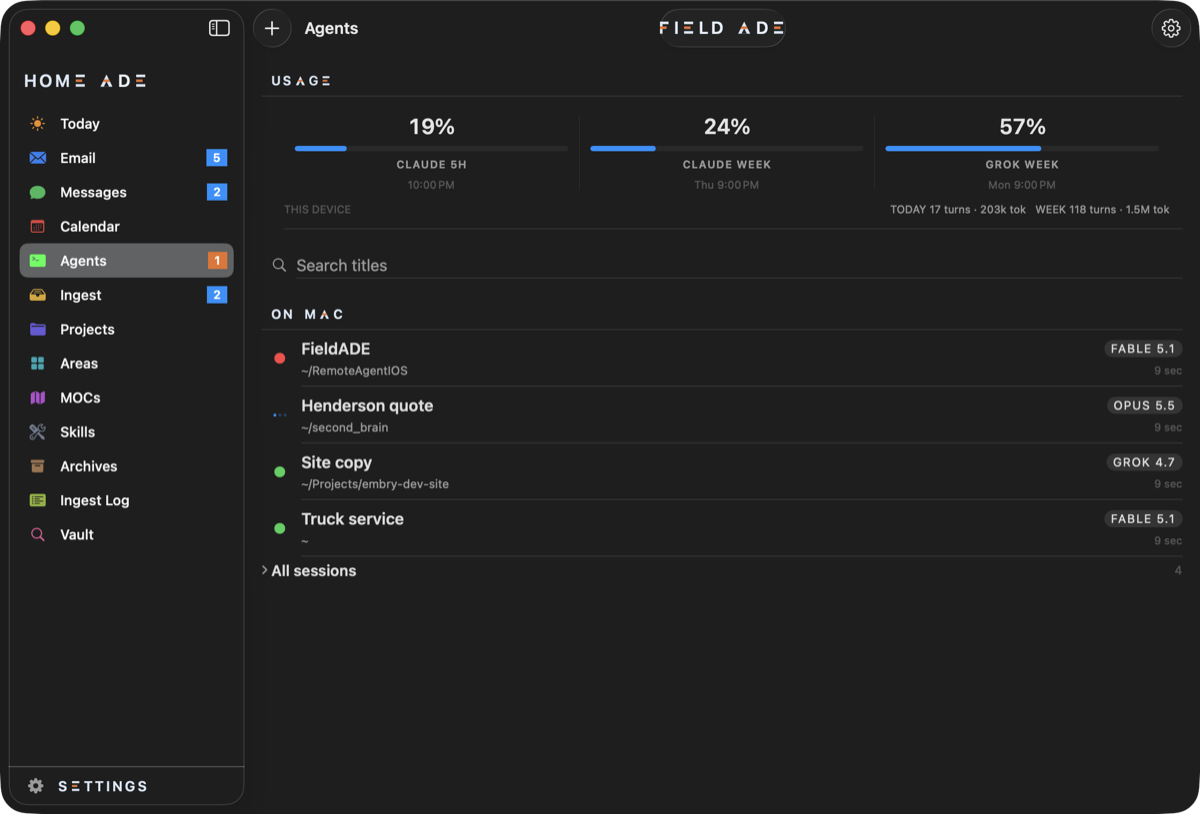
HomeADE runs on your computer. Claude Code, Codex and Grok still do the writing, the same tools you would open in a terminal. HomeADE files what comes in as plain notes, and every later chat reads those notes. It lists every chat, skill, rule and model on the machine, and it runs on its own; FieldADE is optional.
Get it. Download for Mac (macOS 14 or later, signed and notarized; or brew install --cask jtembry/homeade/homeade) · Download for Windows, beta (Windows 10 or later, not yet code-signed) · Release notes
What it is made of
Section titled “What it is made of”- The service. A small program that runs in the background, watches your notes folder and inboxes, runs the agents, and talks to the phone. On the Mac it lives in the menu bar behind an antenna icon with Open at login, Pair a phone, Restart and the log. On Windows it is a tray icon with the same items.
- The window. The same screens as the phone: Today, Email, Messages, Calendar, Ingest, Projects, Areas, Agents, Tickets, Setup and Settings.
- Your notes. A folder you choose. HomeADE makes Projects, Areas and Ingest folders in it if they are missing, and never moves anything out.
Your data
Section titled “Your data”There is no HomeADE account. Notes stay in the folder you chose; chats are stored on this machine; a prompt goes to Claude, Codex or Grok only when you run that chat, under the login you set up. API keys and mail passwords go in the machine’s secret store (the Keychain on a Mac, Credential Manager on Windows). The privacy policy says what leaves the machine.